Custom Products for the Digital Radio Amateur Enthusiast

|
Custom Products for the Digital Radio Amateur Enthusiast |
|
By Kevin Custer W3KKC
Background - The DRA-39(M), DRA-SR-RJ45, or DRA-100-RJ45, allow easy connection to the Alinco DR-MD520 & AnyTone AT-D578UV because all necessary audio and signals appear on the MIC jack. The modification presented here allows connection of any of these DRAs to either of these radio models using a single / common Ethernet cable (containing all 8 conductors) and a Tigertronics SLMOD587 jumper module with one additional jumper wire soldered onto it.
Connecting one of these DRA's to an Alinco DR-MD520 or AnyTone AT-D578UV requires a SLCABRJ4 radio cable, a SLMOD578 jumper module that has been slightly modified. The SignaLink radio cables and jumper modules are not available from Masters Communications. They will need to be sourced elsewhere. These items are available from eBay vendors and directly from Tigertronics.
Since you're only able to connect to the MIC jack of these radio, don't expect this set-up to work at higher transfer speeds. This radio will work on VARA FM Narrow, but is incapable of wide bandwidth and the highest throughputs of VARA FM Wide. This article explains why.
The modification is simple - solder a short insulated jumper wire between pin 4 & 16 on the top side of
the jumper module. Just solder the wire to the pins depicted by the yellow line in the image below:
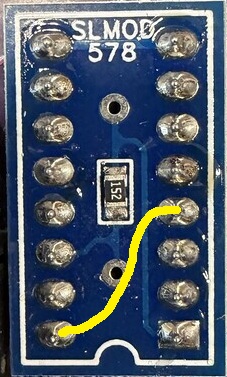
Alternatively, the following manual configuration is possible using a few of the jumper wires provided
and a 1.5k ohm 1/4W resistor (not supplied - but available separately) - as directed here:
Jump pin 4 to 16 with a wire - this puts receive audio from the radios "SPKR +" to the MIC input on the DRA.
Jump pin 1 to 14 with a 1.5k 1/4W resistor - this puts PTT to the radio from the DRA.
Jump pin 8 to 9 with a wire - this is for connection to common ground for all signals.
Jump pin 6 to 15 with a wire - this routes TX audio to the microphone + input of the radio.
More information for those willing to read more:
This modification was the result of a customer buying a DRA-39M and not having good success with audio
levels and they experienced distortion because of the bridged speaker audio amplifier that's present in these
radios. To provide more support for this customer, I went to the Tigertronics website and found the
following reference:
2 - The mic jack on this radio provides a "differential" type Receive Audio output which is not compatible with the SignaLink, so this specific signal is not connected inside the SLMOD578 jumper module. The various signals on the mic jack used for Transmit functionality are connected inside the SLMOD578, but RX Audio is not. Because of this, in addition to the radio cable connection, you will also need to connect the radio's "External Single Speaker" jack to the SignaLink's SPKR jack using the supplied audio cable**. This will complete the RX Audio connection and permit Receive to function properly.
What this means is - no receive audio is connected with the SLMOD578 jumper module. No wonder the customer was having trouble.... Tigertronics tells you to connect the Mono speaker jack of the radio to the 1/8" jack on the sound card interface using a separate cable. This method works on a SignaLink because of the transformers isolating the ground connections - however, you can't do that with DRA's because the grounds are all tied together and are at the same portential.
CAUTION:
I don't recommend using a separate speaker wire from the DRA to the radio as directed by Tigertronics.
Why? Because the radio's mono speaker jack's ground isn't really ground because of the bridged
audio amplifier configuration. As a result, the negative audio amplifier stage becomes shorted
out when the speaker cable is installed between the radio and the DRA. This is because the
DRA's 1/8" speaker jack shield connection is tied to common ground. That's not the case with
a SignaLink because of the existence of isolation transformers that DRA's don't use for
obvious (other) reasons.
THE SOLUTION:
Modifying the SLMOD578 jumper module, adding a single insulated wire to
connect the SPKR + on the radio's MIC connector (pin 4) to pin 16 of the configuration module,
will supply receive audio to the DRA without any risk of harm to the radio - and without the
need of a separate cable. This is only possible because all RA's and DRA's have a coupling
capacitor to negate any bias voltage that exists on this signal. This one simple jump is
all that's required to make this work. By default, each half of a single supply bridged audio
amplifier is referenced to ground. Therefore, you can connect either the (+) positive, or (-)
negative speaker output to a DRA without risk of damaging anything or experiencing any undue
distortion. Simply unsquelch the radio and set R12 (the larger pot or receive level pot)
to 50% rotation and set the speaker level on the radio for sufficient reading on the VU meter
or waterfall display. IMPORTANT: You must unsquelch the radio or you won't have any noise during idle
periods, no waterfall and no VU meter unless there's an actual signal.
NOTE:
This modification will NOT work with a SignaLink. The SignaLink does not have a coupling
capacitor in series with the audio input transformer and the audio input transformer isn't
referenced to common ground. While a coupling capacitor and ground connection could be added
to the SLMOD578 jumper module, SignaLink plainly states their product is not compatible with
radios that have bridged speaker amplifiers - even though they should be. It's probably best
to make the multiple connections to a SignaLink as they recommend.
Email Kevin Custer for additional support.