Custom Products for the Analog & Digital Radio Amateur Enthusiast

|
Custom Products for the Analog & Digital Radio Amateur Enthusiast |
|
Analog Measurement Unit (AMU)
For Analog & Digital Two-Way Radio
Applications
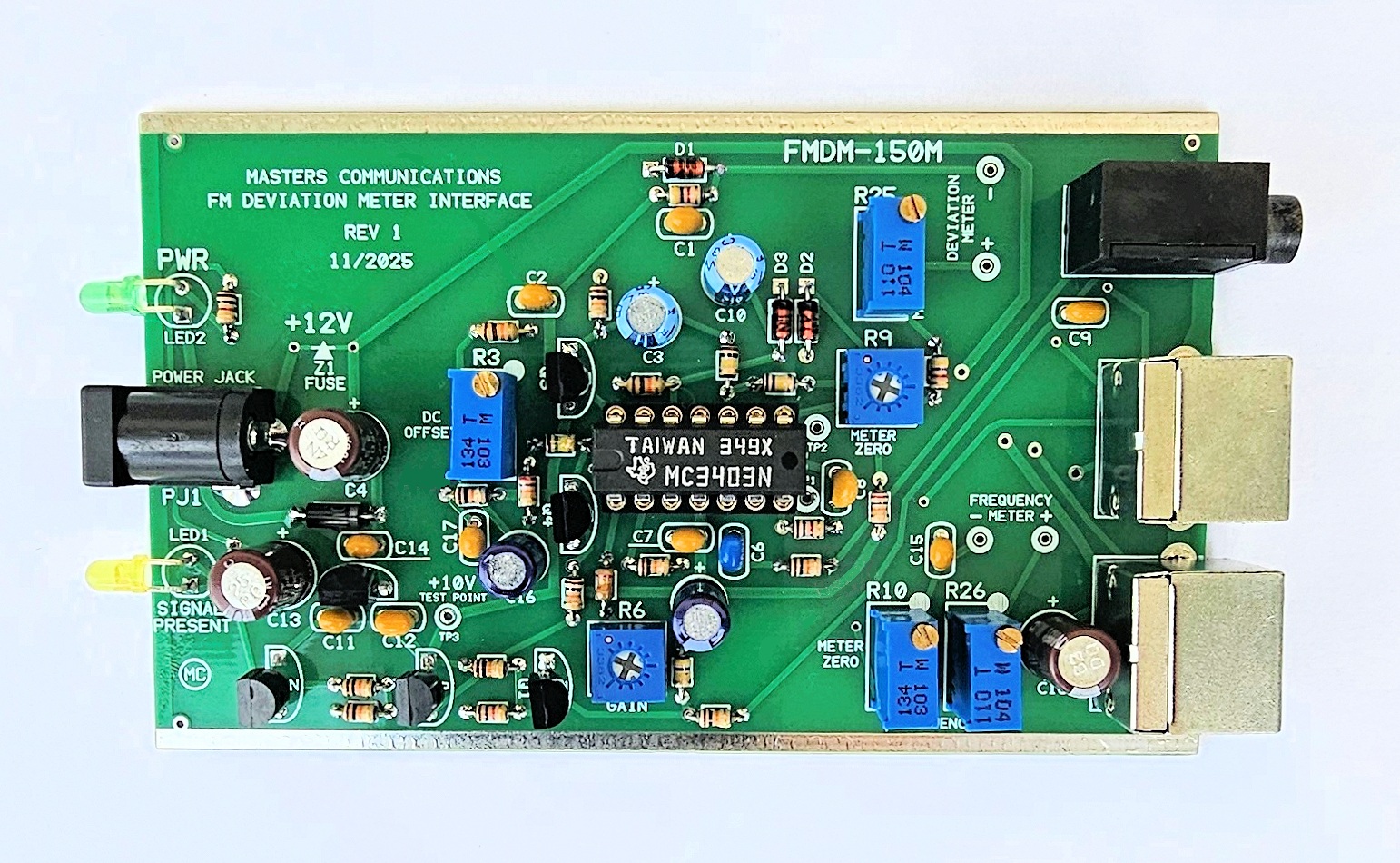
Top side of FMDM-150M Analog Measurement Unit (AMU) circuit board - shown slightly enlarged.
(Click photo to show a larger image)
Please read through this article and the parts list at least
once before starting your assembly.
It will bring your attention to things that need to be done in order to
prevent assembly errors that might be difficult to recover from.
Click here
for Parts List.
The parts list includes several construction notes too! Be sure to reference it
along with this article and the photo above to minimize the possibility of construction mistakes.
Assembly:
If you purchased our kit, refer to the parts list and make sure you have all of the components
you need to build the kit. All of the components are supplied with the kit, and while we make
every effort to be sure we didn't omit any components, it can happen. If you are missing anything,
or ruin something, just contact us.
Assembly can be done by personal choice, but you may find it easier to build in a vertical height order - installing the shortest components first, building toward the tallest. The LEDs already have their leads bent for proper installation. With the exception of the LEDs, all other components are installed tight against the circuit board.
Start by installing all of the diodes observing polarity. The lead on the banded end goes in the square pad hole.
Now install all resistors. Some resistors color bands may be hard to make out. If in doubt, use an ohm meter to verify the value before soldering it in place. Bend both of the resistor leads sharply at the body at a 90 degree angle.
Install the shortest capacitors. Small capacitors are identified as follows: 47 or 470 = 47pF, 102 = 1000pF, 103 = 0.01uF, 473 = .047uF, "104" = 0.1uF. In other words the first two digits are the value and the third digit (if present) is the number of zeros you add to determine the final value. These small capacitors are not polarized and can be installed either way.
Now - install the 3/4 turn Trimpots in locations R6 & R9.
Install the IC socket - match the notch to the silkscreen.
Next, install the transistors (flat to flat on silkscreen). The silkscreen has a letter inside the
outline of the part.
The N stands for NPN (2N2222), and P for PNP (2N2907).
Next, install the voltage regulator (flat to flat on silkscreen). The silkscreen has "VR" inside the outline of the part.
Then - install the 14-pin IC - observing correct orientation. Match the notch on the IC to the notch end of the socket.
Install the larger / taller Electrolytic capacitors. There are a few different values, so make sure you get them into their correct locations. The + of the polarized capacitors go into the holes with the square pad and + sign just outside of the outline.
Next - Install the multi-turn potentiometers. The board has a large white dot that matches up with the end of the control with the brass adjustment slot. Orient them as shown in the photo and solder tightly against the board.
Then, install the power, 3.5mm and Mini-DIN-6 socket connectors.
Then, install the 2 LEDs. NOTE the flat on the LEDs lens and the circuit board outline to insure the correct orientation of the LEDs. The LEDs have their leads pre-bent so they will fit into their holes of the front panel and mount properly. Temporarily place your front panel over the power connector to get the alignment right while soldering them in place. Reheat and readjust if necessary.
Before installing the board into its case, go to
the Calibration Article.
After calibrating the unit - slide the board into the lower set of rails and place the end panels with the 8 - 2.5mm black Phillips head screws.
Parts List:
If you purchased our kit, refer to the parts list and make sure you have all of the components
you need to build it.
Click here
for Parts List.
Support Documentation
Click here for AMU support documentation.
Installation:
This device is intended to be installed beside the scanner and connected with short male
to male stereo cable and (2) male to male Mini-DIN-6 cables to the display(s).
Calibration:
A complete calibration procedure is available from
the Calibration Article.
Secure PayPal ordering is available on the FMDM-150M main page.
Email
Kevin Custer for support, ordering information, order by check, or support of this
exciting product.
Product of Masters Communications, all rights reserved.
Specifications may change without notice.
Images property of Kevin Custer - W3KKC
Board layout by Kevin Custer - W3KKC.
HTML December 7, 2025, W3KKC All Rights Reserved!